
Meta has introduced a new AI feature on Instagram that matters for anyone who cares about how their content is used. As part of its Muse Image model, public Instagram posts and reels can be reused to generate AI images and other remixed content. If your account is public and the setting is on, your visuals are available for this kind of reuse by other users and Meta's AI tools.
For creators, brands and social media managers, this raises real questions about consent, ownership and control. The positive side is that you do have a choice. Instagram includes an opt‑out in the app settings that lets you stop future AI reuse of your posts and reels while keeping your account visible and discoverable.
Where to find the setting
You manage this directly inside the Instagram app. The path is the same for most users:
- Open Instagram and go to your profile by tapping your profile picture in the bottom right.wired
- Tap the three lines in the top‑right corner to open the main menu.wired
- Choose "Settings and privacy".
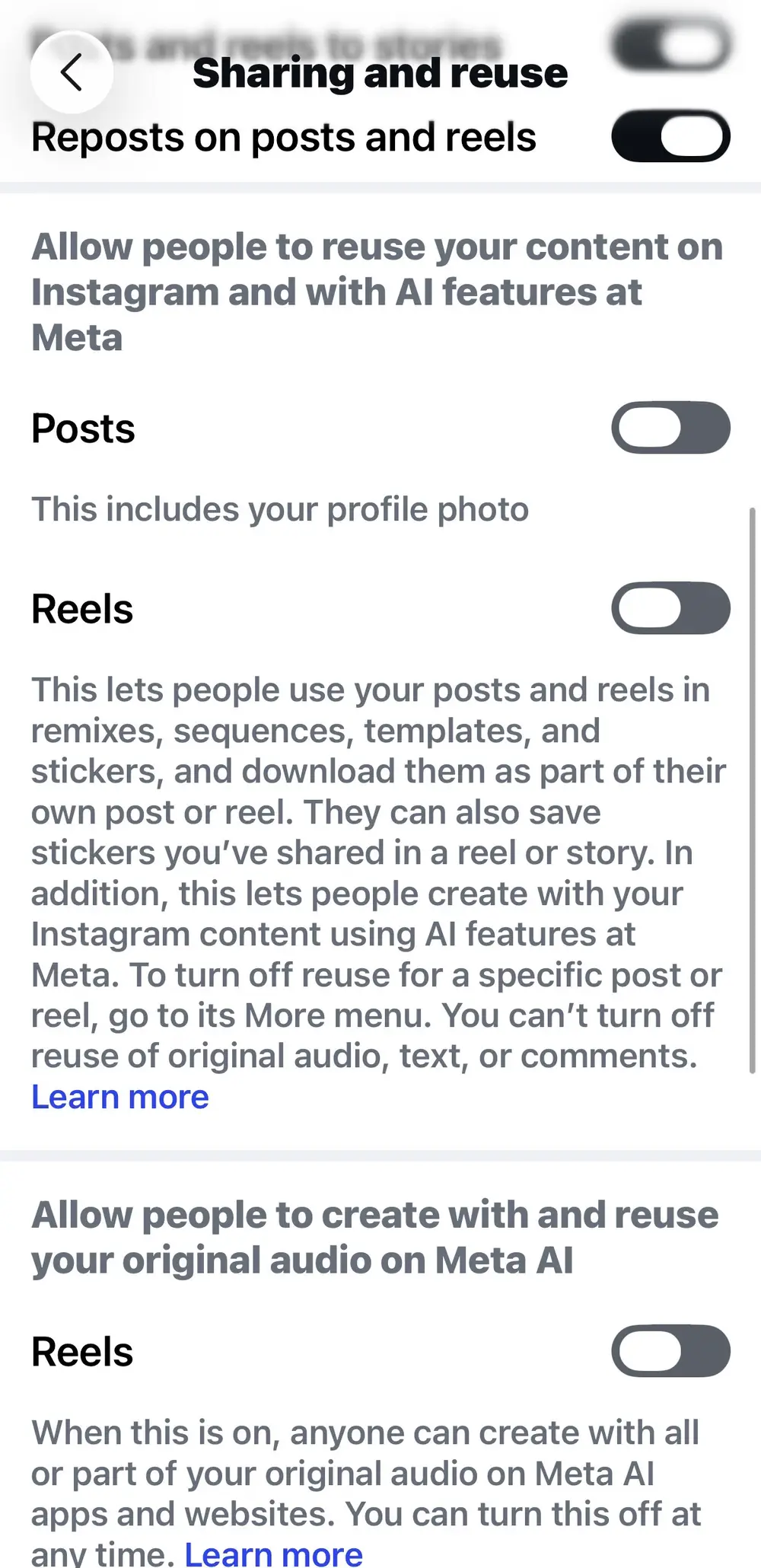
- Scroll down to the section called "Sharing and reuse" (it may appear as "Sharing and Reuse" or "Sharing and remixes" depending on your version).instagram
This "Sharing and reuse" area is now the control centre for remixing and AI‑related reuse of your Instagram content.
Turning off AI reuse for posts and reels
Once you're in "Sharing and reuse", look for a section that uses wording similar to:
"Allow people to reuse your content on Instagram and with AI features at Meta."
Under this, you'll see toggles for different content types, typically:
- Posts
- Reels
- Sometimes feed videos
To turn off AI reuse:
- Switch the toggles for Posts and Reels to the off position.
When those toggles are off, people and Meta's AI tools will no longer be able to generate new AI images from your future posts and reels or reuse them through this feature.
It's important to be clear that this controls what happens from now on. Existing AI images that may already have been generated from your content will not be automatically deleted when you change the setting.
Extra control: per‑post reuse settings
If you want more nuance, Instagram also lets you control reuse on individual posts.
For a specific photo or reel:
- Go to your profile and open the post
- Tap the three dots on that post
- Look for an option to turn off reuse or remixes and confirm
That stops new remixes being made with that particular piece of content, without changing your global settings across the whole account.
Private accounts and AI reuse
One more layer to consider is account status. Private accounts are excluded from this Muse Image reuse feature by default, so only approved followers can see and access your content, and that content is not used to generate AI images in the same way.
For many brands and creators, staying public is essential for reach and growth, so the practical option is to keep the account public but turn off AI reuse via the "Sharing and reuse" settings. That way you remain discoverable while setting firmer boundaries around how your content is processed and repurposed.
Why this matters for social media pros
If you manage social media as part of your role or business, this is no longer just a personal preference; it's part of basic platform governance.
Some practical steps you can take:
- Audit every Instagram account you run - brand, client, community and personal - and check the "Sharing and reuse" settings for each.
- Decide on a clear stance for each account: is AI reuse acceptable for this profile, or should it be turned off by default?
- Add these toggles to your onboarding checklist for new accounts and your regular platform health checks.
- Communicate your position to your audience and clients so they understand how you're protecting their content and likeness.
We're in a phase where AI and social media are intersecting more aggressively with ownership and consent. Public doesn't have to mean "anything can be scraped, remixed and regenerated forever", and it's worth taking a moment to set the boundaries that feel right for you and the communities you serve.